If you read the previous post about detecting Edge extensions, you already know the general idea: extensions expose resources at predictable URLs, and a page can try to load them to figure out what the user has installed. Today we are looking at the same thing on Chrome, but I stumbled onto a variation that keeps things a lot quieter.
The Obvious Way and Why It Gets Annoying
The first thing you try is something like this:
fetch("chrome-extension://ghbmnnjooekpmoecnnnilnnbdlolhkhi/page_embed_script.js")
  .then(() => console.log("Google Docs Offline is installed"))
  .catch(() => {});
Or an image:
var img = new Image();
img.onload = function() { alert("Extension installed"); };
img.src = "chrome-extension://ghbmnnjooekpmoecnnnilnnbdlolhkhi/logo.png";
Both work fine when the extension is there. The problem is when it is not — the browser still tries to load the URL, fails, and logs a 404 to the DevTools console. If you are probing a handful of extensions, that is a handful of red errors sitting there in plain sight. Not great.
Playing Around with Object Tags
I was trying different element types to see if any of them handled the failure more quietly, and the <object> tag caught my attention. When it fails to load something — either because the extension is not installed or the resource is not listed in web_accessible_resources — it just does nothing. No console error, no network noise. It disappears silently.
But when the resource is there, onload fires normally.
var obj = document.createElement("object");
obj.setAttribute("style", "width:1px;height:1px;visibility:hidden");
obj.onload = function() { alert("Extension installed"); };
obj.data = "chrome-extension://ghbmnnjooekpmoecnnnilnnbdlolhkhi/page_embed_script.js";
document.documentElement.appendChild(obj);
That is really all there is to it. If you want something even shorter:
document.documentElement.appendChild(Object.assign(document.createElement('object'), {type: 'text/plain', data: 'chrome-extension://ghbmnnjooekpmoecnnnilnnbdlolhkhi/page_embed_script.js', onload: () => alert('Extension installed'), style: 'width:1px;height:1px;visibility:hidden'}))One Thing to Watch Out For
I noticed that in some desktop webview environments, <object> fires onload even when the resource did not load — a false positive. So before probing anything real, it is worth testing first with a URL that is guaranteed not to exist. If onload fires for that, the technique is not reliable in this context and you should give up for this session.
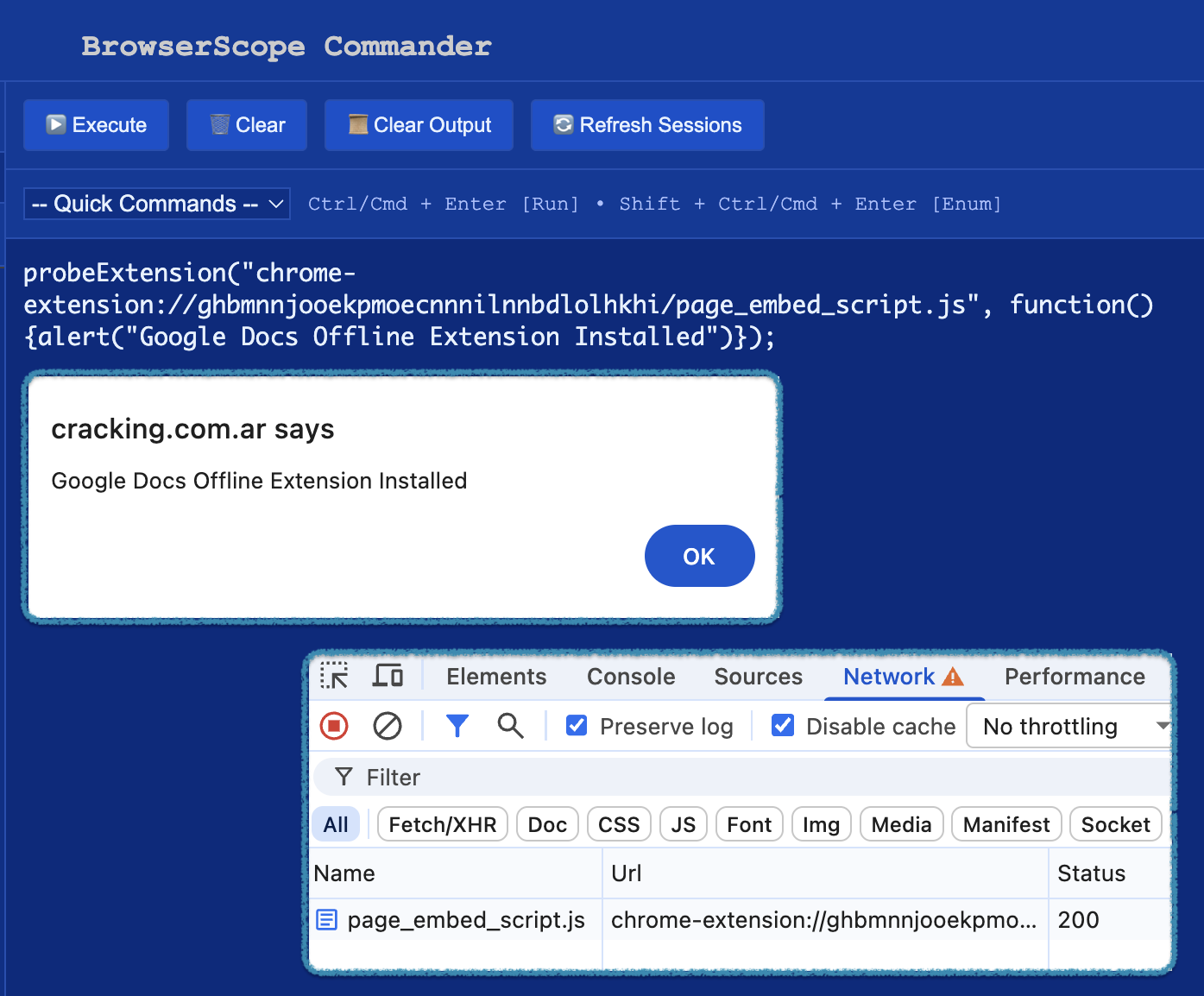
That is the job of the probeExtension and initProbeExtension functions below. I also added a div to hold the <object> elements so they can be cleaned up easily after each batch — otherwise you’d end up with a DOM full of invisible objects after probing a long list.
Putting It Together
The full version uses a small state machine to handle the timing:
NOT_INITIALIZED→ first call kicks off calibrationINITIALIZING→ waiting for calibration, probes are queuedREADY→ calibration passed, work through the queueERROR→ false positive detected, stop here
var scratchDiv = document.getElementById("scratch");
const ERROR = -1, NOT_INITIALIZED = 0, INITIALIZING = 1, READY = 2;
var state = NOT_INITIALIZED;
var queueExtensions = [];

function initProbeExtension() {
  if (state === NOT_INITIALIZED) {
    state = INITIALIZING;
    var obj = document.createElement("object");
    obj.setAttribute("style", "width:1px;height:1px;visibility:hidden");
    obj.type = "text/plain";

    // If 400ms pass without onload firing, we are probably safe.
    var toInvalidLoad = setTimeout(function() {
      state = READY;
      probeExtension();
    }, 400);

    // If this fires, something is wrong — bail out.
    obj.onload = function() {
      state = ERROR;
      clearTimeout(toInvalidLoad);
    };

    // A URL that should never resolve.
    obj.data = "chrome-extension://life_is_good/when_you_are_good.json";
    scratchDiv.appendChild(obj);
  }
}

function probeExtension(url, callback) {
  if (arguments.length > 0) {
    queueExtensions.push([url, callback]);
  }

  if (state === READY) {
    while (queueExtensions.length > 0) {
      var obj = document.createElement("object");
      obj.setAttribute("style", "width:1px;height:1px;visibility:hidden");
      obj.type = "text/plain";
      var ext = queueExtensions.shift();
      obj.onload = ext[1];   // callback
      obj.data   = ext[0];   // extension URL
      scratchDiv.appendChild(obj);
    }

    // Clean up after 1.5s, then process anything new that came in.
    state = INITIALIZING;
    setTimeout(function() {
      scratchDiv.innerHTML = "";
      state = READY;
      if (queueExtensions.length > 0) { probeExtension(); }
    }, 1500);

  } else if (state === NOT_INITIALIZED) {
    initProbeExtension();
  }
}
Trying It
probeExtension(
  "chrome-extension://ghbmnnjooekpmoecnnnilnnbdlolhkhi/page_embed_script.js",
  function() { alert("Google Docs Offline is installed"); }
);
If the extension is installed, the alert fires, the console stays clean, with no evidence it ever ran. You can queue up as many probes as you want — they will wait for calibration to finish and then run in order.
The Usual Caveats
This only works for resources that the extension explicitly declares as web_accessible_resources in its manifest. An extension that exposes nothing cannot be detected this way, and plenty of them don’t expose anything. But a lot of popular ones do — injected scripts, icons, update helpers — and those are enough to make a reasonable guess about what someone has installed.
The interesting part is really just the silence. It is a small thing, but it matters.